

| Cyber readiness is the state of being prepared to prevent, detect, respond to and recover from a cyber attack. It is not a product you buy or a certificate you earn once. It is the set of controls, habits and written processes that decide whether an incident costs your business two days or two months. |
Your customer portal goes offline at 10am on a Monday. Would your staff know who to call, what to shut down, and what to tell clients while the systems are unavailable? Would anyone know whether the backups from Sunday night are usable? If those answers are uncertain, the gap is not in your security tools. It is in your cyber readiness.
There is already a free, government-written description of how to close that gap. On 30 October 2025 the NCSC published ten Minimum Cyber Security Standards. They are mandatory only for government agencies under the Government Chief Information Security Officer mandate, but they are published openly, and nothing stops a private business using them. For a New Zealand SME they are a free, government-authored description of what good looks like. Health NZ has adapted the same ten standards for health providers, and our guide to the Health NZ security checklist covers that version.
This guide organises those ten standards into seven pillars of cyber readiness, our own grouping, that fit a small or medium team, with one specific action for each that you can take this week.
Why Are Security Tools Only Part of Cyber Readiness?
Cyber readiness matters more than your tools because tools fail quietly and cyber readiness is what you fall back on when they do. Antivirus that has not updated, a backup job that has been erroring for six weeks, an alert that arrives at 2am to an unmonitored inbox: none of those show up until the day they matter. Cyber readiness is what covers the gap between a tool failing and somebody noticing.
The New Zealand picture supports treating this as an operational problem rather than a purchasing one. In the year to 30 June 2025 the NCSC recorded 5,995 incident reports, down from 7,122 the year before, while direct financial loss reported over the same period rose to $26.9 million from $21.6 million. Fewer reports, more money lost. Reporting to the NCSC is voluntary, so both figures are best read as a floor rather than a full picture.
Of those, 331 incidents were triaged as being of potential national significance, a figure the NCSC describes as “largely stable”. That is a national security statistic rather than a small business one: most New Zealand businesses will never appear in it, and their own cyber readiness still decides how their bad week goes. The full NCSC Cyber Threat Report 2025 sets out the method behind both numbers.
What Are the Seven Pillars of Cyber Readiness?
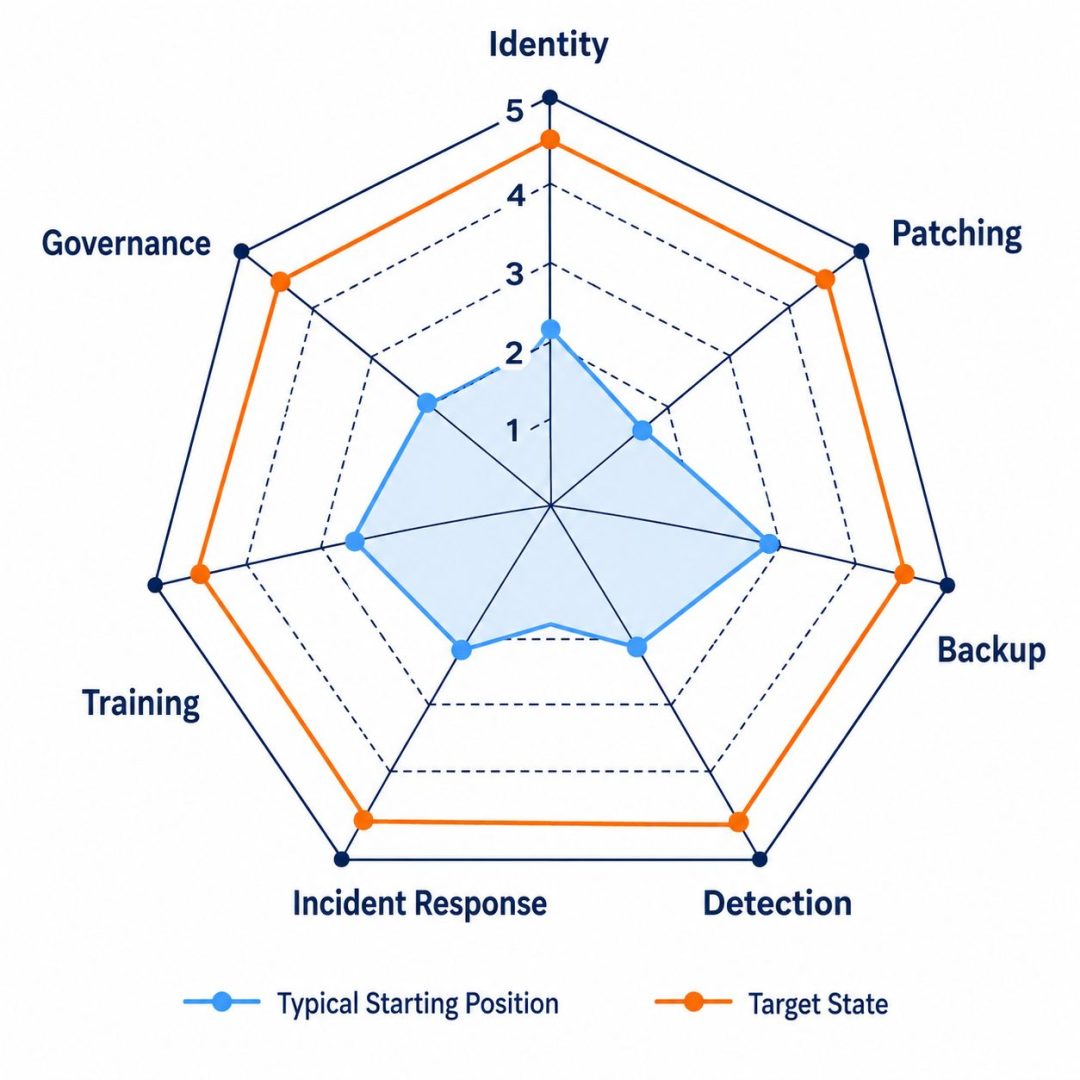
The seven pillars of cyber readiness are identity and access, patching, backup and recovery, detection, incident response, staff awareness, and governance. They are our way of organising a readiness review, and they map to the ten NCSC minimum cyber security standards. Mapping to a standard is not the same as implementing it, so treat this as a way to find your priorities rather than a compliance assessment. Each pillar has a first action small enough to finish this week.
| Pillar | NCSC standards it covers | First action this week |
|---|---|---|
| 1. Identity and access | Multi-factor authentication, Least privilege | List every admin account. Confirm MFA on each one. Remove admin rights from anyone who does not need them. |
| 2. Patching | Patching, Secure configuration of software | Run a patch compliance report. Start with critical-rated fixes on anything reachable from the internet, then work through the rest in order of exposure. |
| 3. Backup and recovery | Data recovery | Find the date of your last tested restore. If it is more than 90 days ago, book one and write down the result. |
| 4. Detection | Detect unusual behaviour | Check who receives alerts outside business hours, how they escalate, and who can authorise containment at 2am. |
| 5. Incident response | Response planning | Open your response plan. Confirm every named person has a named deputy and your insurer’s number is in it. |
| 6. Staff awareness | Security awareness | Find the date of your last phishing simulation. If it is more than six months ago, schedule one and record the failure rate. |
| 7. Governance | Risk management, Assets and their importance | Put a monthly check of the four numbers in your calendar, and a six monthly governance review. Pick the weakest control here and give it an owner today. |
The order is deliberate. Identity and patching close two of the routes attackers use most often, backup and detection decide how bad an incident gets, and the last three decide whether your cyber readiness still holds twelve months from now.
How Do You Get Identity and Access Under Control?
You get identity and access under control by requiring multi-factor authentication on the accounts people sign in with, starting with administrators and anything reachable from the internet, separating administrator accounts from everyday ones, and removing access the day somebody leaves rather than the month after. In our experience stolen or reused credentials are one of the most common routes into a small business, and a stolen password only matters if the account behind it is still reachable. Cyber readiness at this pillar is judged by the exceptions rather than the intentions.
The usual failure is not an absence of MFA. It is MFA on most accounts. One finance mailbox or one service account left outside the policy is the account an attacker will find. Cyber insurance proposal forms also usually ask directly whether MFA is in place, and if your answer does not match your actual configuration an insurer may treat that as a misrepresentation, which can become an issue at claim time. Answer against what your systems actually do rather than what you intended to finish, and talk to your broker if you are unsure how to describe a partial rollout. Our multi-factor authentication guide covers what a complete deployment looks like.
How Fast Should You Be Patching?
Patch critical and high severity vulnerabilities within days, not weeks, and cover every device rather than only the servers. Once a vulnerability is publicly disclosed, internet-facing systems are routinely scanned for it very quickly, so anything reachable from the internet should be the first thing you patch rather than the last. The NCSC puts numbers on that for government agencies: critical-rated patches within two days of release on external-facing systems, or wherever working exploits exist, and within two weeks on internal systems. Those figures do not bind a private business, but the gap between two days and two weeks is the whole argument for sorting systems by exposure before setting any deadline.
Laptops, phones, network gear and cloud platforms all need to sit inside the same patch cycle as the servers. Software that no longer receives patches at all is a different problem, because no cadence fixes it. Cyber readiness here means the cadence is written down and somebody checks it against reality.
Windows 10 Home, Pro and Enterprise reached end of support on 14 October 2025, with version 22H2 the final release and routine monthly security updates stopping on that date. The Enterprise LTSC editions run on a separate lifecycle and are supported for longer, so check the edition before writing a machine off as unsupported. Extended Security Updates are available for Windows 10 on paid terms for business devices, so the question for any remaining Windows 10 machine is not whether it is old but whether it is still receiving security updates. Find out which of yours are enrolled and which are simply unpatched.
How Do You Know Your Backups Actually Work?
You know your backups work when you have restored from them recently and written down how long it took. A backup job with a green tick is a report, not a capability, and this is the pillar where cyber readiness is most often assumed rather than proven.
Three copies, two media types, one offsite and one offline, often called the 3-2-1-1 rule, is the standard worth holding to. The offline copy carries most of the weight, because attackers commonly go after the backups they can reach over the network before they encrypt anything else. Recovery time and recovery point objectives should be set for each critical system and then proven by an actual restore. Our data backup strategy guide sets out the architecture in full.
How Do You Spot an Attack While It Is Still Happening?
You spot an attack in progress with monitoring that runs outside business hours and looks at behaviour rather than matching known signatures. Attacks do not wait for Monday, and attackers often spend time inside a network before anything is encrypted. That period is where cyber readiness earns its keep, because detection is still possible.
By the time encryption starts your options have narrowed sharply, though prompt containment can still limit how far it spreads. The capability worth paying for is detecting the quiet phase before it: an account logging in from somewhere new, a service account behaving like a person, data moving in volumes nobody scheduled. That quiet phase is where an incident is either contained or allowed to become a recovery job.
What Should an Incident Response Plan Contain?
An incident response plan needs named people with named deputies, the decisions each of them is allowed to make without asking, your insurer’s after-hours number, the Privacy Act notification triggers, and a way to reach staff and clients when the usual systems are down.
The test is not whether the plan covers every scenario. It is whether your finance manager and your operations lead could work through their own sections at 11pm on a Friday with the primary systems unavailable. If they could not, the plan is too long, and a shorter one stored somewhere reachable offline will do more good. A plan nobody can follow under pressure is a document rather than cyber readiness. Our guide to the incident response plan works through each element.
How Do You Train Staff So the Training Sticks?
Training sticks when it is repeated and practical rather than annual and theoretical. The habit worth building is the pause before clicking, and habits come from practice, not from a presentation in the staff room each February. This is the pillar where cyber readiness depends least on what you have bought.
One of the larger datasets on this comes from the security training vendor KnowBe4, which analysed 67.7 million simulated phishing tests across 14.5 million users at 62,400 organisations worldwide. In organisations whose staff had not yet been trained, 33.1% of users took an unsafe action in a simulated test. KnowBe4 calls this the Phish-prone Percentage, and it counts clicking a link, opening an attachment, entering data or replying, not clicks alone. After twelve months of monthly simulations combined with training, it fell to 4.1%.
Two figures from that dataset are worth noting here. The Australia and New Zealand regional baseline was 36.8%, and organisations with fewer than 250 staff started at 24.6%. Both come from KnowBe4’s own customer base rather than a representative sample of New Zealand businesses, so treat them as a direction of travel rather than a target.
The technique your staff will meet has also changed. Generative AI has removed the poor spelling and awkward phrasing that used to give phishing away, and voice and video impersonation of executives has been reported in real cases. Anyone in finance or operations needs a verification step for out-of-process requests involving money or credentials, applied regardless of how convincing the caller sounds. Our security awareness training service runs the lessons, phishing simulations and reporting for you.
Who Owns Cyber Readiness in Your Business?
Cyber readiness should be owned by one named person, usually the owner, general manager or operations lead, with the authority to make security decisions and a budget to act on them. Governance is the pillar that decides whether the rest of your cyber readiness stays current, because every new staff member, new supplier and new system quietly changes your exposure and none of those changes announce themselves.
At a minimum, cyber readiness governance means a named owner for security decisions, a written list of approved tools and how data may be handled, a review at least twice a year, and a simple backlog of known gaps with owners against them. For any business holding personal information the Privacy Act 2020 adds a reason beyond good practice: it requires reasonable steps to protect that information, and documented controls are how you demonstrate the steps were taken if you ever have to.
How Do You Measure Cyber Readiness?
Track cyber readiness with a small set of measures: MFA coverage, patch compliance, tested restores in the last 90 days, and your most recent phishing simulation failure rate. Define the scope and the owner of each one, because a good headline number can still hide an unprotected critical system. These are indicators that show whether important controls are working and whether gaps are closing. They support a readiness review rather than replacing one. If you cannot answer one of them today, finding the answer is a sensible first action.
- MFA coverage. The percentage of accounts with MFA enforced. Aim for 100% on admin, finance and cloud platform accounts before anything else.
- Patch compliance. The percentage of devices patched inside the deadline you have agreed for their exposure, reported alongside any critical vulnerabilities still overdue. A fleet-wide percentage can look healthy while one internet-facing server stays unpatched, so track the overdue items as well as the average. If coverage and overdue items are unknown, nobody can say whether the patching process is working.
- Tested restores. The number of successful restores in the past 90 days. One per quarter per critical system is a reasonable starting cadence rather than a universal minimum.
- Simulation failure rate. The percentage of staff who took an unsafe action in your most recent phishing test, counting clicks, attachment opens, data entry and replies. Record it once, then watch the direction rather than the number.

Each of these four is either true or it is not, which makes them a better measure of cyber readiness than any policy folder.
Figures in this article are drawn from the NCSC Cyber Threat Report for the year to 30 June 2025 and from KnowBe4’s phishing benchmarking report published in May 2025.
Get Help With Cyber Readiness
Exodesk has supported New Zealand businesses since 1989. Today, our Christchurch and Dunedin teams support businesses nationwide. We can check where your business stands on the four measures above and work through the gaps in order.
NEXT STEP
Which of these can you answer today?
Not sure which of these to tackle first? Talk to us about your cyber readiness, or book an IT assessment for a broader review of where your business stands. We work with businesses across Christchurch and Dunedin.
Or read more about our cyber security services.
Frequently Asked Questions
What is cyber readiness?
Cyber readiness is the state of being practically prepared to prevent, detect, respond to and recover from a cyber attack. It covers technical controls such as MFA and patching, written processes such as an incident response plan, and human factors such as training and ownership. A ready organisation has tested capabilities and clear accountability rather than security tools installed and forgotten.
What are the seven pillars of cyber readiness?
Identity and access, patching, backup and recovery, detection, incident response, staff awareness, and governance. They map to the ten NCSC minimum cyber security standards, though this is a way of organising a review rather than a complete implementation checklist. Each addresses a distinct area of exposure, and the grouping fits a business of any size without a dedicated security team.
How is cyber readiness different from cyber security?
Cyber security covers the people, processes and technology used to manage cyber risk. Cyber readiness is about how prepared the business is to put those into practice: whether incidents get detected, whether someone can make the decisions, whether the backups actually restore, and whether the controls stay current as the business changes. A business can hold every tool on the market and still be unready.
Do the NCSC minimum cyber security standards apply to my business?
Not as an obligation. The ten standards, published on 30 October 2025, are mandatory only for the government agencies covered by the Government Chief Information Security Officer mandate. They are published openly, so a private business can use them as a free reference written by the national cyber security agency rather than by a vendor. Your own requirements may still come from contracts, sector rules or other obligations, and following this guide does not establish compliance with any of them.
How often should cyber readiness be assessed?
Annually is a reasonable starting cadence, with another look after any significant change to your systems, staffing or premises. The baseline measures are worth reviewing more often than that because they move. Walking the response plan through as a tabletop exercise twice a year is a sensible habit, since a plan nobody has read is close to no plan. Set the actual frequency by your own exposure rather than treating these as universal minimums.
What is the 3-2-1-1 backup rule?
Three copies of your data, on two different media types, with one kept offsite and one kept offline or otherwise isolated. Isolation matters because attackers commonly go after the backups they can reach over the network before they encrypt anything else, but access controls, retention and a tested restore all count too, and a copy you have never restored from is not yet a backup. Our data backup strategy guide covers how to build it.
What should an incident response plan include?
Named individuals with named deputies for every role, the decisions each can make without escalating, the contact details for your insurer and notification timeframes, Privacy Act 2020 triggers, and a way to reach clients and staff when the usual systems are unavailable. Keep it short enough that somebody can follow it under pressure.
Does a gap in MFA affect a cyber insurance claim?
It may, depending on the policy terms and on what you told the insurer. Insurers commonly ask whether multi-factor authentication is in place, and an answer that does not match your actual configuration can affect how a claim is handled. Check the controls you really have against your policy and your application answers, and ask your broker or insurer about any gap or change. Not every MFA gap has the same consequence. This is general information rather than legal or insurance advice.
What does AI change about readiness?
Mainly it raises the quality floor of phishing. A message can now be well written and sound like a colleague, so good spelling and a familiar tone are not evidence that a request is genuine. Voice and video impersonation of executives is documented in real cases. That makes staff training and out-of-band verification more important than they were, and it makes speed of detection matter more, because automated tooling shortens the gap between a stolen credential and its use.
What is the minimum position for a small New Zealand business?
Start with the systems and information the business actually depends on, then work through account protection, urgent updates, recovery, staff reporting and who can respond to an incident. For a team under 50 people that usually means MFA on email, cloud and admin accounts; patching on a schedule the business can sustain, with critical-rated fixes on internet-facing systems treated as urgent; backups with one isolated copy and a tested restore each quarter; a clear answer on who watches alerts outside business hours; a one-page response plan with names and insurer details; phishing simulations at least twice a year; and one person who owns the decisions. Treat those cadences as starting points and set the order by your own exposure and the impact of a failure, rather than by headcount alone.
How does the Privacy Act relate to all this?
The Privacy Act 2020 requires agencies to take reasonable steps to protect the personal information they hold, and where a privacy breach has caused or is likely to cause serious harm, to notify both the Office of the Privacy Commissioner and the affected individuals as soon as practicable. Documented controls are the evidence that reasonable steps were taken, and a tested response plan is what gets those notifications made in time. A business with neither is in a weaker position in any investigation.
Where should a business start if none of this exists yet?
Start with identity, because it closes a common route in and much of it sits inside licences you already hold, though conditional access and rollout can carry cost. Audit your admin accounts, enforce MFA on all of them, and remove rights nobody uses. Then take the first action from each of the other six pillars in order. The point is a short list of finished things rather than a programme, because that is how cyber readiness actually gets built.
Contact us or call 0800 396 337 to talk about cyber readiness.

