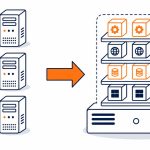
| Microsoft Intune is a Microsoft cloud service for managing supported devices and work apps. It checks enrolled devices against your compliance rules and reports the result to Microsoft Entra, where Conditional Access policies can use it to allow or block access to the resources they cover. |
A staff member can have the correct password while signing in from a laptop your business does not manage. Whether that connection reaches email and files depends on the access rules you have configured, not on the password alone.
This guide explains how Microsoft Intune, device compliance and Microsoft Entra Conditional Access work together, what protects work data on personal phones, which licences you need and the limits to plan around. It is written for business owners and managers rather than IT specialists.
For device enrolment, rollout and ongoing management delivered for you, see our mobile device management service.
What is Microsoft Intune?
Microsoft Intune is a cloud-based endpoint management service. It enrols and configures supported Windows, macOS, iOS and Android devices, deploys apps, applies settings and protects work data inside compatible apps. For enrolled devices, it also assesses compliance with the rules you set and reports that status.
Intune does not make the access decision on its own. That job belongs to Microsoft Entra Conditional Access, which can use Intune compliance and app protection as signals alongside who is signing in, from where and to which resource. Microsoft documents how Intune adds device and app signals to Conditional Access.
Where does Intune sit in your Microsoft 365 setup?
Intune, Entra ID and the Microsoft 365 apps share the same accounts, so a policy can combine the user, the device and the app being opened. The Intune admin centre also shows the Conditional Access settings, which is one reason the two products are confused. It is the same Conditional Access configuration found in Microsoft Entra.
How does device compliance support access decisions?
A compliance policy sets the checks an enrolled device must pass, such as a supported operating system version, disk encryption or a screen lock. Available checks depend on the platform and setup. Intune marks the device compliant or noncompliant and reports the result to Microsoft Entra, where an access policy can require the device to be marked compliant.
Compliance information updates as devices check in with Intune and through supported event-driven checks. It is not a fresh inspection of every setting each time someone opens a file. Microsoft notes that compliance evaluation depends on when a device checks in, and a device that stops reporting within the configured validity period is treated as noncompliant.
A compliant result means the device met the configured checks. It does not prove the device is free of malware or that the account using it is safe, which is why endpoint security and monitoring sit alongside it.

Two example devices checked against the same policy. A Conditional Access policy can require compliance for the resources it covers.
What can a compliance policy check?
Settings include minimum operating system versions, encryption, a password or screen lock, signs of a jailbroken or rooted phone and, where licensed and connected, a threat level reported by a security product. You can apply different policies to different groups, so a company laptop holding client records can meet a stricter standard than a shared tablet.
What happens when a device stops meeting the rules?
Intune marks it noncompliant and can notify the user with steps to fix it. You can set a grace period before the status changes, so a missed update does not cut someone off mid-task. Compliance checks identify the problem; they do not fix every setting automatically. Configuration policies, updates and support follow-up do that work.
How does Microsoft Entra Conditional Access work with Intune?
Conditional Access applies the rules configured for the user, the application and the circumstances of the sign-in. For example, a policy can require a compliant device before allowing access to selected work resources. A sign-in that does not meet that requirement can be blocked or given a different control, depending on how the policy is written.
That can make a stolen password less useful for the resources in scope. The result depends on which users, apps and devices the policy covers and which exceptions exist. Multi-factor authentication, endpoint protection and account monitoring still have work to do, which is why Conditional Access forms one part of an identity and access management approach.

Example requiring device compliance. Entra applies the configured policy using the status Intune reports.
What does this look like day to day?
Take a policy that requires a compliant device for email and SharePoint. A staff member on an enrolled, compliant laptop signs in as normal. The same person on an unmanaged home computer is blocked from those resources, unless the business has configured a separate option such as limited browser access. Someone with a stolen password on an unknown device is blocked from the covered resources, while anything outside the policy depends on its own controls.
Limited browser access and download restrictions need their own supported configuration. They are not automatic fallbacks for every unmanaged device.
How do you protect work apps on personal phones?
For supported apps and platforms, Intune app protection policies control work data inside the app without enrolling the whole phone. Rules can restrict copying and pasting work data into personal apps, require a PIN to open the work app and remove work data from the app when someone leaves, without touching personal photos or messages. Microsoft explains that app protection works with or without device enrolment.
This differs from requiring the device itself to be managed and compliant. An app-based Conditional Access policy can require an approved app with app protection instead of a compliant device. Settings and support vary by platform and app, so confirm which work apps your staff use before promising coverage.
| Question | Enrolled company device | App protection on a personal phone |
|---|---|---|
| What is managed | The device, its settings, apps and compliance | Work data inside supported apps |
| What an access policy can require | A device marked compliant | An approved app with app protection |
| Example controls | Encryption, screen lock, updates and app deployment | App PIN, copy and save restrictions |
| When someone leaves | Full or selective wipe of the device | Removal of work data from the apps |
| Privacy boundary | The business manages the device | Personal apps and data stay outside management |
Explain the privacy boundary and permitted actions to staff before rollout. People are more willing to use work apps on their own phones when they know what the business can and cannot see.
Which Microsoft licences do you need?
Check your exact subscriptions rather than assuming. Microsoft 365 Business Premium includes Intune Plan 1 and Entra ID P1, which Conditional Access requires. Business Basic and Business Standard do not include Intune or Conditional Access, although both can be added. Enterprise bundles such as Microsoft 365 E3 and E5 include Intune, while Office 365 plans with similar names do not.
A licence covers the software, not the work. Setup, rollout and ongoing management depend on device ownership, operating systems, applications and existing policies, and sit separately from the licence cost.
How do you plan rollout and ongoing management?
Start with an inventory of devices, who owns them and which apps staff use. Then set the compliance baseline, decide what personal phones need, and only then connect compliance to access. The order matters: if the access policy goes live before devices report as compliant, staff are blocked.
How do you avoid locking staff out?
A careful rollout reduces lockout risk rather than removing it. Microsoft Conditional Access planning guidance recommends report-only mode to see the effect of a policy on real sign-ins before enforcement, testing with a pilot group and excluding emergency access accounts. Tell staff what will change, how to fix a noncompliant device and who to call if they cannot get in.
What does ongoing management involve?
Agree who follows up devices that stop reporting, handles exceptions, reviews sign-in reports and changes policies as staff and equipment change. Offboarding also needs a clear owner, so access is removed and work data is wiped from apps when someone leaves.
Does Microsoft Intune help with the Privacy Act?
Information Privacy Principle 5 requires security safeguards that are reasonable in the circumstances for personal information. Device settings, app protection and access controls can support those safeguards. Their value depends on configuration and follow-up, and Microsoft Intune does not by itself establish compliance with the Privacy Act 2020.
Microsoft Intune support from Exodesk
Exodesk delivers device management and Microsoft 365 support, so we could provide the work described in this guide. We set out the licences, the rollout work and the limits, and the choice of how far to go stays with you.
Our mobile device management service covers supported enrolment, compliance policies and work-app protection, with ongoing responsibilities agreed. Access policies sit within our wider cyber security work.
Exodesk has supported New Zealand businesses since 1989. Today, our Christchurch and Dunedin teams support businesses nationwide.
NEXT STEP
Need help with rollout?
Tell us which devices your team uses and what work staff do on personal phones. Our mobile device management service covers supported enrolment and work-app protection, with ongoing responsibilities agreed.
Or contact Exodesk with your questions.
Frequently Asked Questions
What is Microsoft Intune?
Microsoft Intune is a cloud service for managing supported devices and work apps. It can assess enrolled devices against compliance policies and report that status to Microsoft Entra for use in access decisions.
What is Conditional Access in Microsoft Intune?
Conditional Access is a Microsoft Entra feature, even when configured through the Intune admin centre. It applies access policies using signals that can include Intune device compliance and app protection.
What is a compliance policy?
It sets the checks a device must meet, such as encryption or a minimum operating system version. Intune reports compliance status. An Entra access policy can use that result to restrict access to resources in scope.
How is Microsoft Intune different from mobile device management?
Mobile device management is the practice of enrolling and configuring devices. Intune is one platform that provides it, alongside app protection and compliance reporting. Microsoft Entra supplies the Conditional Access policies.
Do I already have Microsoft Intune?
Check your exact subscription. Business Premium includes Intune Plan 1, while Business Basic and Standard do not. Some enterprise bundles include it, but Microsoft 365 and Office 365 plans with similar names can have different entitlements.
Does Microsoft Intune stop stolen passwords being used?
A configured access policy can require a compliant device and reduce misuse of a stolen password for covered resources. This does not prevent every account attack. MFA, endpoint protection and monitoring remain important.
Can Microsoft Intune manage apps as well as devices?
Yes. It can deploy supported apps and apply work-data protection in compatible apps. App protection can be used on supported personal phones without managing the whole device. The available controls depend on the platform and app.
Will Conditional Access lock my staff out?
It can if policies affect a device, app or sign-in staff rely on. Report-only evaluation, pilot testing, staff guidance and emergency access planning reduce that risk. Test the actual working arrangements before wider enforcement.
How does Microsoft Intune support the Privacy Act?
Device settings, app protection and access controls can support reasonable safeguards for personal information. Their value depends on configuration and follow-up. Intune does not by itself establish Privacy Act compliance.
Is Microsoft Intune worth setting up for a small business?
It is worth considering when staff use Microsoft 365 across company and personal devices. Check the controls needed, existing licences and the setup and management work. Use those requirements to judge value rather than assuming every small business needs the same configuration.
Contact us or call 0800 396 337 to talk about the devices your team uses.